

Compare construction bookkeeping alternatives: software, outsourced help, and spreadsheets. Find the right fit for your contracting business.
Back to contractor finance →Why Manual Construction Bookkeeping Breaks Down
Manual construction bookkeeping is the practice of recording job costs, invoices, and payroll by hand or in generic spreadsheets, without construction-specific systems.
Here's why: a remodeler's books have to answer questions a retail store's books never ask. Which job made money? Which change order was never billed?
Spreadsheets can hold that data, but connecting it reliably takes formulas, controls, and ongoing maintenance.
Construction Accounting Software: What It Handles
Construction accounting software is a system built to track costs by job, phase, and cost code rather than by month alone. It handles what general bookkeeping can't: progress billing, retention, change orders, and labor burden tied to specific projects.
QuickBooks Online for Small Contractors
QuickBooks Online is a common starting point for small contractors. It handles accounts payable and receivable and day-to-day transaction records; payroll is a separate service. QuickBooks job costing depends on the plan and setup: Intuit confirms that Plus and Advanced include Projects and project profitability tracking. You do not always need an add-on for basic job-level reporting. More detailed construction cost codes, committed costs, retainage, and specialized billing may require additional tools and a disciplined setup.
FOUNDATION, Sage 100 Contractor, and Knowify
FOUNDATION, Sage 100 Contractor, and Knowify are construction-focused options with different roles. Sage 100 Contractor combines accounting with construction project management. Knowify integrates with QuickBooks Online to connect project activity and accounting records. FOUNDATION offers construction job costing with detailed budgets and reports. Compare the modules, integrations, training, and total price each business needs. None of these tools replaces a bookkeeper who understands construction workflows.
| Software | Best For | Job Costing Depth | Setup Effort |
|---|---|---|---|
| QuickBooks Online | Small contractors | Projects in Plus/Advanced; add-ons for deeper needs | Depends on setup |
| Sage 100 Contractor | Established contractors | Built-in | High |
| Knowify | QuickBooks users needing job costing | Strong | Medium |
| FOUNDATION | Contractors needing detailed construction accounting | Strong | High |
Outsourced Construction Bookkeeping: When to Hire Help
Outsourced construction bookkeeping is when you hand your books to an outside firm that specializes in contractors.
The tell is simple: if you're spending evenings reconciling receipts instead of bidding work, you are giving up time that could go toward bids, field work, or rest. A specialist also brings something software cannot: a review process and a person accountable for keeping the books current.
This is where Golden Bookkeeping fits. We combine monthly bookkeeping with fractional CFO guidance, so a job-costing report comes with an explanation of what to do about it.
Before hiring anyone, ask to see a sample job-costing report for a contractor like you. Ask how they track labor burden, retainage, and missing job costs, and whether their sample matches the reporting you need.
Construction Bookkeeping Spreadsheets: Still Viable?
Spreadsheets remain viable for one-person operations with a handful of jobs. They become harder to maintain once you are tracking multiple crews, retention, and change orders. At that point, stronger controls and a responsible reviewer matter as much as the spreadsheet itself.
The honest answer: a well-built spreadsheet is better than no system at all. But the maintenance cost is invisible until it bites. Every job adds rows, every change order adds a manual update, and every manual update introduces another opportunity for error.
One costly spreadsheet risk is unbilled change orders. If your system doesn't flag them automatically, you'll finish jobs having done work you never invoiced.
Construction Accounting Software With Job Costing: Key Features
Construction accounting software with job costing should support the features your contracts require: assign direct costs to jobs and cost codes, track committed costs against the project budget, generate progress billing and AIA-style pay applications where required, allocate labor burden by job, and produce current gross profit reports per project. Reports are only as current as the receipts, bills, and time entries behind them.
Software handles data entry and recordkeeping. It does not decide whether a cost code is right or whether a job is priced to make money. That judgment is still human, which is why the best setups pair specialized tools with an accountant who reads the output.
Side-by-Side: Manual vs. Software vs. Outsourced Bookkeeping
The decision contractors actually face is not "which app", it is "which operating model." There are four viable alternatives to manual construction bookkeeping, and they are not interchangeable. The right one depends on transaction volume, project count, and how much of your week you can afford to lose to data entry.
Here is the honest comparison, including the costs nobody puts in a feature table.
| Approach | Best For | Cost Components | Job Costing | Setup / Migration | Main Risk |
|---|---|---|---|---|---|
| Manual / spreadsheets | Solo operator with a few simple jobs | Low cash cost; ongoing owner time | DIY, fragile | None | Silent errors, unbilled change orders |
| DIY accounting software | Small contractor with manageable transaction volume | Subscription fee plus add-ons | Plan and setup dependent | Configuration and training | Misconfigured chart of accounts and cost codes |
| Software + part-time bookkeeper | Growing contractor with several active jobs | Subscription plus bookkeeping labor | Strong if cost codes are enforced | Setup plus cleanup of prior records | Two people entering the same data differently |
| Outsourced construction bookkeeping | Owners who need construction reporting and less bookkeeping work | Monthly service fee, typically scaled to transaction volume | Confirm reporting and review in the scope | Onboarding and cleanup depend on record quality | Poor fit if the firm does not specialize in construction |

The cost nobody prices in
Subscription fees are the visible cost. The real cost of manual bookkeeping is owner time. To estimate the value of your time, multiply the hours you spend on bookkeeping by a realistic hourly value for your own work. Only time that can actually become paid work is foregone billable revenue, and revenue is not the same as profit. Compare your own time value against the full cost of each option.
Switching to software can still leave you spending time learning the tool and cleaning up misclassified costs. A clear setup and someone responsible for construction workflows can help turn the purchase into a useful time saving.
Total cost of ownership, honestly framed
When comparing options, add these line items, not just the sticker price:
- Subscription or service fee, recurring.
- Setup and migration, one-time; higher if prior records are messy.
- Ongoing labor, yours or a bookkeeper's, measured in hours per month.
- Error correction, the cost of finding a misclassified cost code three months later, after the job is closed.
- Opportunity cost, billable hours you did not work because you were reconciling.
Before you compare quotes, count your transactions for a typical month: bank and card transactions, vendor bills, payroll runs, and customer invoices. Transaction volume helps estimate bookkeeping effort. Payroll, accounts, job complexity, integrations, and reporting needs also affect the quote and software plan. Avoid counting the same purchase twice when a bank feed matches an existing vendor bill.
Where each option actually breaks
- Manual / spreadsheets become harder to control as concurrent jobs, retention, and change orders multiply.
- DIY software breaks when nobody enforces cost codes and the job-costing report stops matching reality.
- Software plus a generalist bookkeeper breaks when the bookkeeper does not understand progress billing, retainage, or labor burden.
- Outsourced specialists can fail through unclear scope, delayed records, weak communication, or lack of construction experience. Ask for a sample job-costing report and an agreed reporting schedule before signing.
The decision matrix is not about which tool is best. It is about which operating model matches your transaction volume and project complexity today, with room to grow one step without a full rebuild.
How to Choose Based on Business Size and Project Complexity
Revenue alone is a poor selector. Two contractors with similar revenue can need different systems depending on how many jobs run at once, how many cost codes each job carries, and whether they bill progress or lump sum. Use the two criteria below together as a starting point for discussion.
Criterion 1: Transaction volume
Count a typical month's bank and card transactions, vendor bills, payroll runs, and customer invoices. Use a consistent count without double-counting matched records. It helps estimate workload, alongside payroll, accounts, integrations, and reporting complexity. The suggestions below are starting points. They are not vendor limits or industry standards.
- Light transaction workload: A disciplined spreadsheet or entry-level accounting software may be workable when jobs and reporting needs are simple.
- A growing transaction workload: Consider accounting software with job costing, or software plus a part-time bookkeeper.
- A busy transaction workload: Consider dedicated construction accounting software, with a bookkeeper or outsourced firm running it.
- A high-volume or complex workload: Consider dedicated in-house or outsourced bookkeeping with suitable software. The owner still approves key decisions and reviews exceptions.
Criterion 2: Project complexity
Complexity is not revenue. It is the number of moving parts per job.
- Simple, repeat jobs (service calls, small remodels): A small, consistent cost-code list and basic job costing may be enough.
- Multi-phase jobs (custom homes, commercial build-outs): Multiple cost codes, change orders, and progress billing. Committed-cost tracking is useful; AIA-style pay applications are needed only when the contract or customer requires that format.
- Multi-project firms: Several jobs running concurrently with shared crews and equipment. Look for labor burden allocated by job, retainage tracked by project where applicable, and current gross-profit reports based on posted records.
Matching the option to the contractor
These examples suggest options to explore rather than a required upgrade path. A smaller business can need more support than a larger one, and outsourcing can be useful at any stage.
- Solo contractor with simple jobs: Consider entry-level accounting software with a disciplined cost-code list before committing to a larger construction platform.
- Small trade business with multiple crews: Consider adding job-costing software or outsourcing monthly bookkeeping when manual updates become difficult to keep current.
- Growing general contractor with multi-phase projects: Consider construction-specific accounting software plus a fractional CFO or outsourced specialist who reviews the job-costing output.
- Larger firm with several complex projects: Explore a full construction accounting platform, dedicated bookkeeping, and CFO-level review if the workload and decisions justify them.
The transition plan most owners skip
If material purchases are scattered across receipts and card statements, use this material cost tracking workflow as part of cleanup.
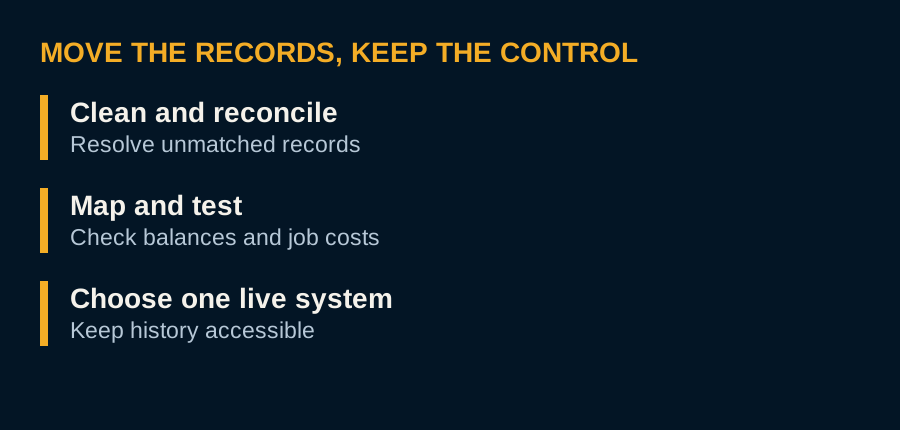
Messy records make migration harder, but clean records still require careful mapping, testing, and training. A practical sequence to consider:
- Clean up first. Reconcile bank and card accounts, review completed jobs, and investigate stale balances before moving records. Do not write off balances without confirming the accounting and tax treatment with your adviser.
- Rebuild the chart of accounts. Map income and cost accounts to construction categories, direct labor, materials, subcontractors, equipment, overhead, not generic retail categories.
- Standardize cost codes. Pick one list (CSI divisions or your own) and use it in estimating, purchasing, and accounting. If estimating and accounting use different codes, job costing will never reconcile.
- Set up job costing before entering history. Configure jobs, phases, and cost codes, then agree on a cutover date and migration scope with your bookkeeper. Transfer the opening balances and open-item detail needed to reconcile accounts and active jobs, and preserve accessible historical records. The IRS recordkeeping guidance explains why supporting records matter; do not discard history just because you change software.
- Validate before cutover. Keep the old system readable and compare opening balances, unpaid bills, customer balances, and active job reports. If you use a parallel test period, set clear rules to prevent duplicate invoices, payments, or payroll. Choose one system of record for live processing.
- Train the field. Whoever submits receipts, timesheets, and change orders needs a one-page process, not a manual.
A costly migration failure is importing a messy historical file into clean software. You get the same bad job costing, now with a monthly subscription.
Choose by transaction volume and project complexity together. A contractor juggling several complex jobs may need more support than a larger business handling a few repeat builds.
Picking the Right Fit
The right alternative to manual construction bookkeeping depends on how many jobs you're running and how much you need to know about each one. Start with the reporting and support you need before choosing the most expensive software. Accurate job costing and someone who can read it matter more than a long feature list.
That's the gap Golden Bookkeeping fills. We specialize in contractors, building trades, and real estate operators, combine bookkeeping with fractional CFO guidance, and start every engagement with a complimentary Profit Review to find where your margin is leaking.
Frequently asked questions
What are the alternatives to manual construction bookkeeping?
The main alternatives are construction accounting software, outsourced construction bookkeeping services, and improved spreadsheets. Software like QuickBooks Online, FOUNDATION, Sage 100 Contractor, and Knowify handle job costing and invoicing. Outsourced services provide a dedicated bookkeeper who understands construction workflows. Each option fits different business sizes and project complexity, so the right choice depends on your volume and need for current job profitability reports.
Is construction accounting software better than general accounting software?
Construction accounting software is built for job costing, progress billing, and AIA pay applications, while general accounting software like QuickBooks Online handles basic bookkeeping and can be adapted with add-ons. For contractors with multiple ongoing projects and complex cost codes, construction-specific tools reduce manual work and improve accuracy. Small contractors with simple jobs may find general software sufficient when paired with a knowledgeable bookkeeper.
Can construction bookkeeping be outsourced?
Yes. Outsourced construction bookkeeping services can handle day-to-day transactions, accounts payable and receivable, and job costing. Payroll, bill payment, and advisory work depend on the agreed scope. This option suits contractors who want to offload bookkeeping without hiring in-house staff. When evaluating providers, look for experience with construction workflows, cost codes, and progress billing. Golden Bookkeeping, for example, offers a free Profit Review to assess your current financial health before you commit.
How do I choose a bookkeeping system for a small construction business?
Start by listing your must-haves: job costing, progress billing, payroll, and receipt tracking. If you run a few straightforward jobs and have limited admin time, simple software plus a part-time bookkeeper may work. For growing firms with multiple crews and projects, construction accounting software with job costing or an outsourced team provides better visibility. Consider total cost of ownership, including software fees, training, and any cleanup needed.
What software features matter most for construction job costing?
The most important features are cost code tracking, job profitability reports, progress billing, and integration with payroll and accounts payable. Current visibility into project costs versus revenue helps you catch overruns early. Look for software that supports AIA pay applications if you work on commercial projects. Also check whether it integrates with your existing accounting system or requires a full migration.
Related insights

